User Guide
1. About the National Medicines Registry
The National Medicines Registry Information System (NMR IS) is the central source of data on medicines in the Republic of Slovenia. It contains reliable and up-to-date data on medicines for use in human medicine, as well as selected other products related to treatment.
The NMR IS is managed by the Ministry of Health, the Agency for Medicinal Products and Medical Devices of the Republic of Slovenia (JAZMP), the Health Insurance Institute of Slovenia (ZZZS), and the National Institute of Public Health (NIJZ).
Data in the NMR IS includes basic information about medicines (e.g. active substance, pharmaceutical form, strength, packaging), as well as professional documentation such as the Summary of Product Characteristics (SmPC) and the package leaflet.
Medicine data from the NMR is available through the public NMR website to healthcare professionals and the general public for reviewing medicine data and supporting decision-making and work in healthcare.
Hierarchical structure of medicine data
Medicine data in the NMR is organized hierarchically, in four levels. This structure enables consistent linking of data and supports different ways of searching and displaying data.
The hierarchy consists of:
- Level 1 – generic name of the medicine: contains the generic name of the medicine, i.e. the active substance.
- Level 2 – descriptive name of the medicine: in addition to the generic name, it also includes the pharmaceutical form and strength of the medicine.
- Level 3 – proprietary name of the medicine: represents the proprietary (brand) name of the medicine together with its strength and pharmaceutical form.
- Level 4 – medicine package: contains data on the specific package of the medicine.
The hierarchical structure enables data entry and processing by individual levels – from Level 1 (active substance) to Level 4 (package). The system ensures links between the levels and data consistency.
2. What the website offers
The NMR website provides access to medicine data in one place. Users can:
- quickly search for medicines by code, name, active substance, or ATC code,
- review key data on medicines (e.g. pharmaceutical form, strength, packaging),
- access the Summary of Product Characteristics (SmPC) and package leaflets,
- export data for further analysis or use (e.g. in Excel).
The website is available at www.nrz.ezdrav.si and is intended for both healthcare professionals and the general public.
It is adapted for use on computers and modern mobile devices.
3. Quick start
To quickly search for data on a medicine, follow these steps:
- Enter the code, medicine name, active substance, or ATC code in the search field on the home page.
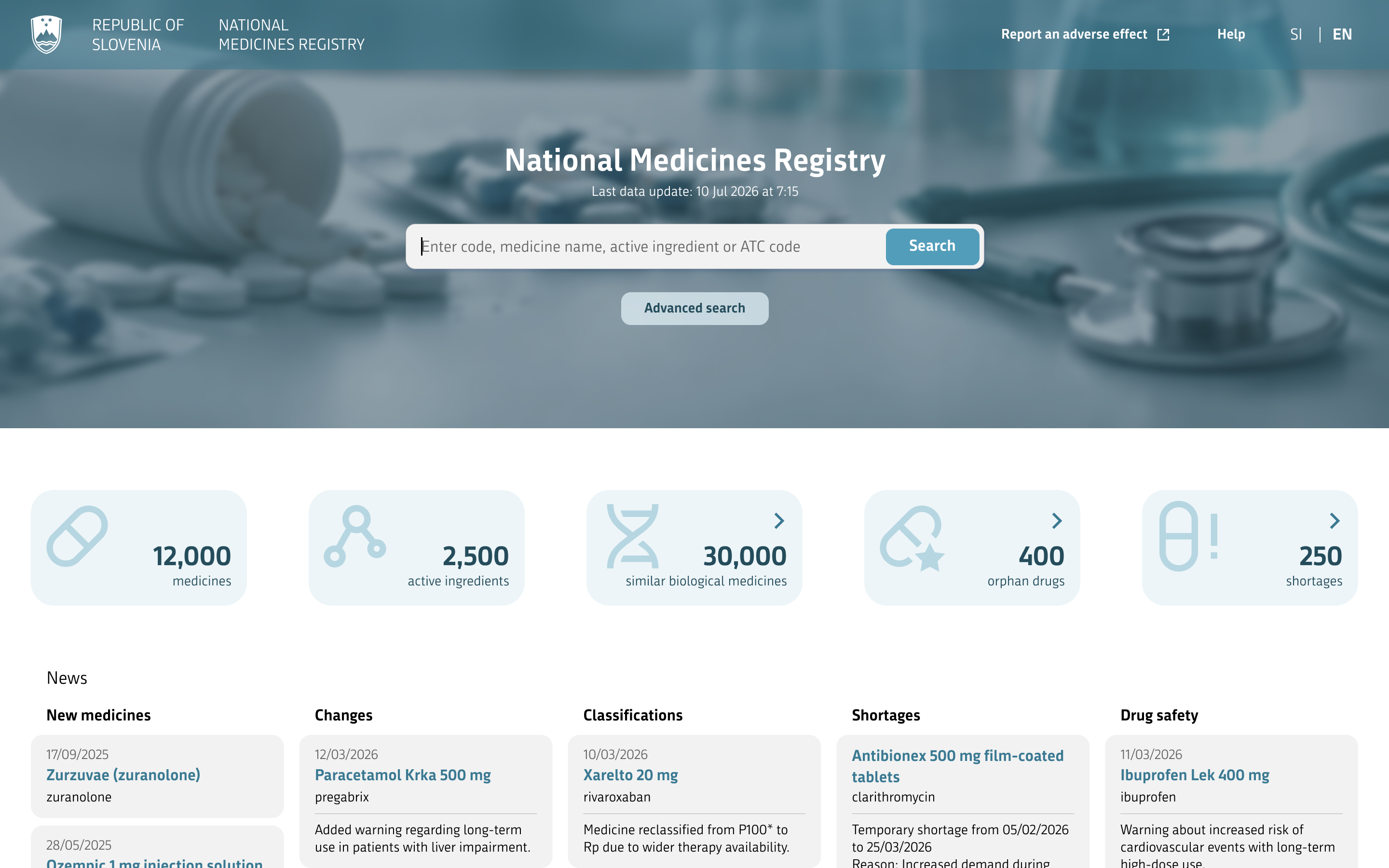
- While typing, suggestions are displayed in a drop-down list.
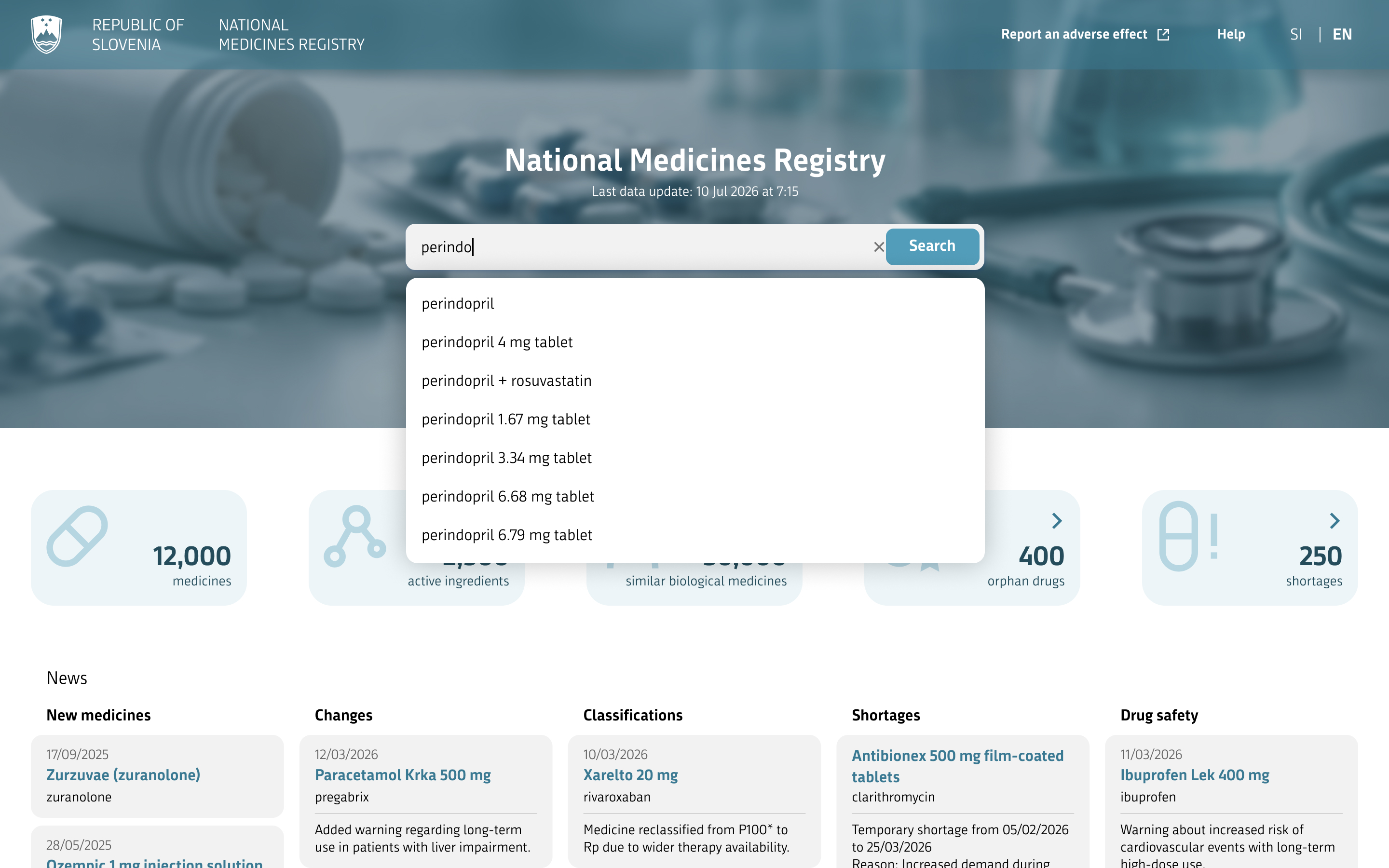
- Select one of the suggestions or press Enter, or click the Search button to display all results.
- After the search is performed, a list of results is displayed.
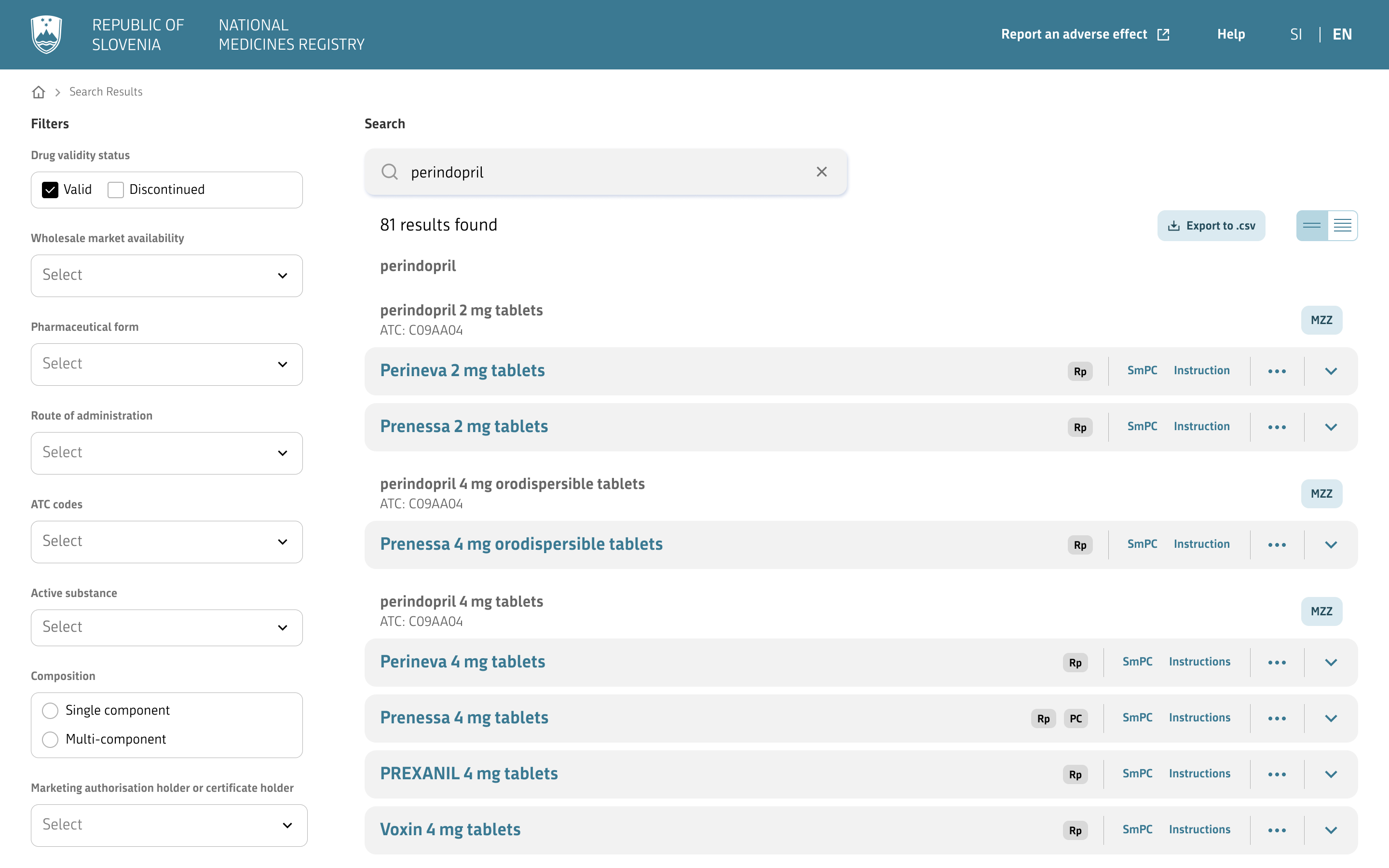
- You can further narrow the results using filters.
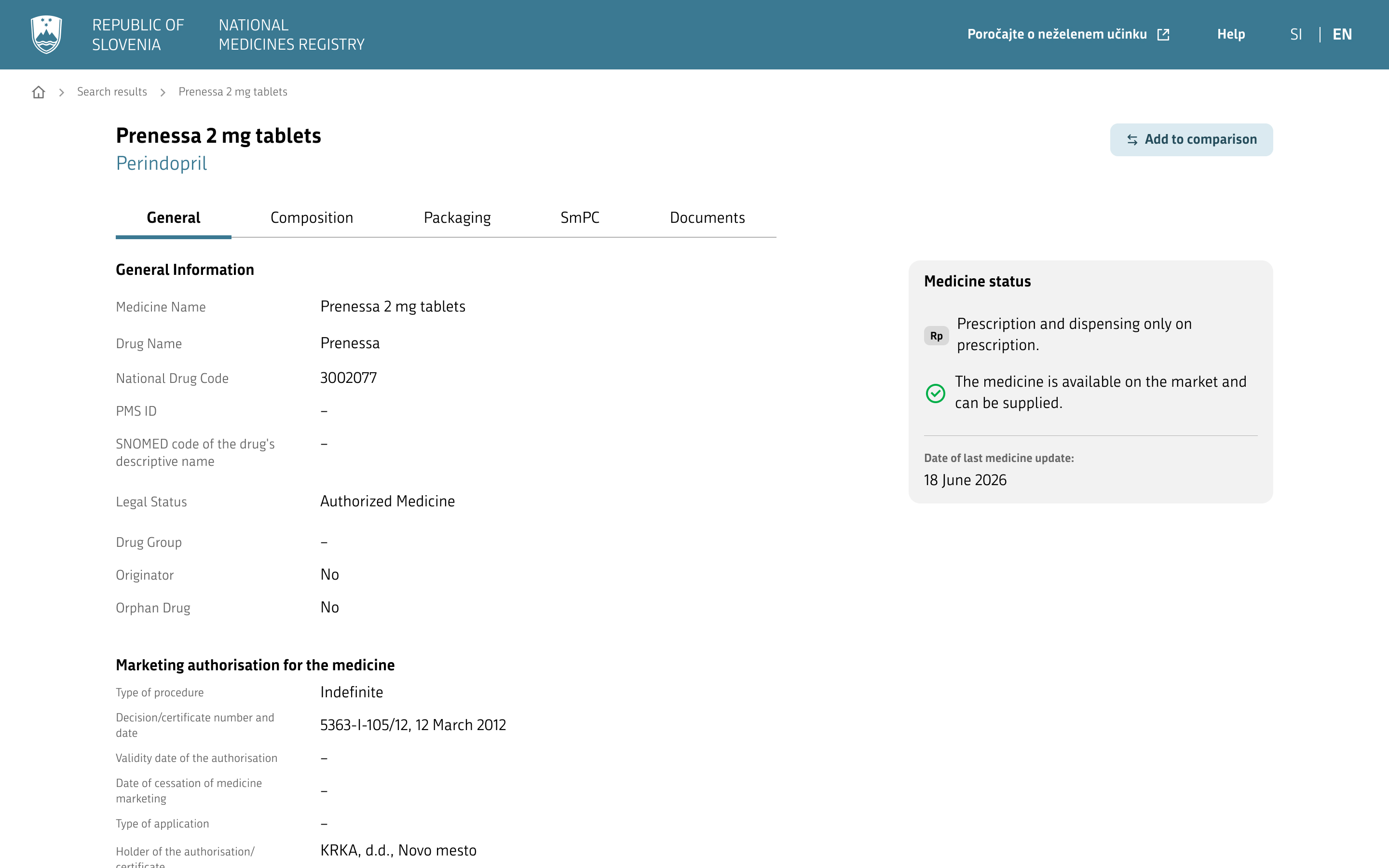
- To view details, click the selected medicine.
4. How to use the website
The NMR website enables simple searching and review of medicine data. The basic usage flow is described below – from the home page to viewing details.
4.1. Home page
When you open the website, the home page is displayed, providing quick access to key information and functionalities.
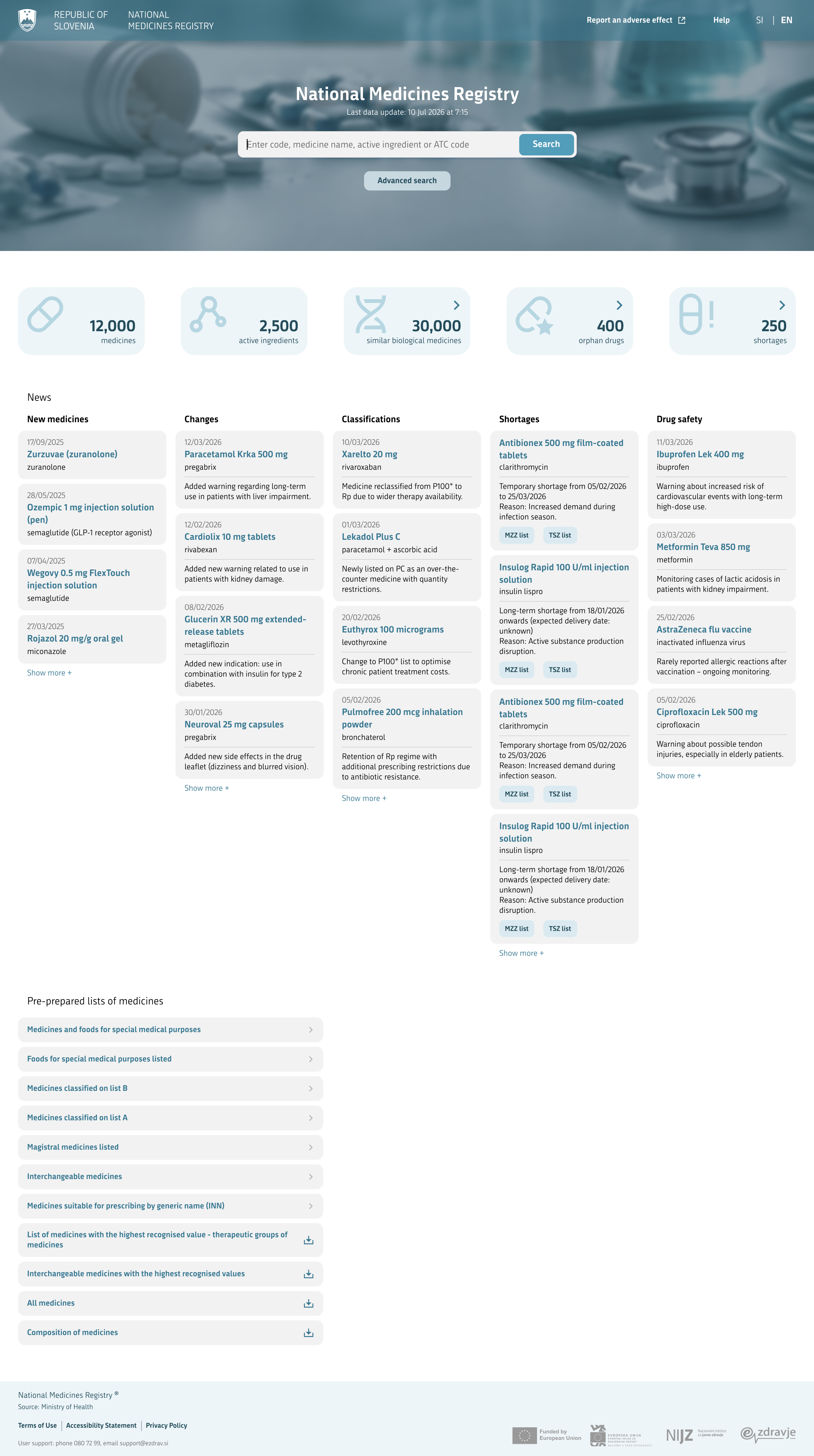
The following sections are available on the home page:
Search engine
The central part of the page is the search engine, which enables quick searching for medicines by name, active substance, or other criteria. Suggestions (autosuggest) are displayed while entering text, making it easier to select the appropriate result.
Registry information
Basic data on the contents of the National Medicines Registry (NMR) is displayed, such as the number of medicines, active substances, biosimilar medicines, orphan medicines, and shortages. Some data (biosimilar medicines, orphan medicines, and shortages) is also accessible via direct links.

News
Current news from the most recent period is displayed, divided into the categories new medicines, changes, shortages, classifications, and medicine safety.
Predefined lists of medicines
Instead of searching manually, you can access the most commonly used lists of medicines via direct links. Open an individual list by clicking its name.
4.2. Searching data
Search enables quick searching for medicines by code, medicine name, active substance, or ATC code.
While typing, suggestions (autocomplete) are displayed to help you find the desired medicine faster. When you select a result, the list of hits opens.
4.3. Displaying the search results list
Search results are displayed as a list that the user can browse in a collapsed or expanded view.
The collapsed view contains basic information about the medicine:
- medicine name,
- special labels,
- dispensing method.
The expanded view additionally displays all available packages of each medicine, together with:
- code,
- dispensing method,
- protective symbol,
- list,
- regulated price,
- agreed price,
- MRV (Maximum Recognized Value),
- indicative co-payment,
- availability.
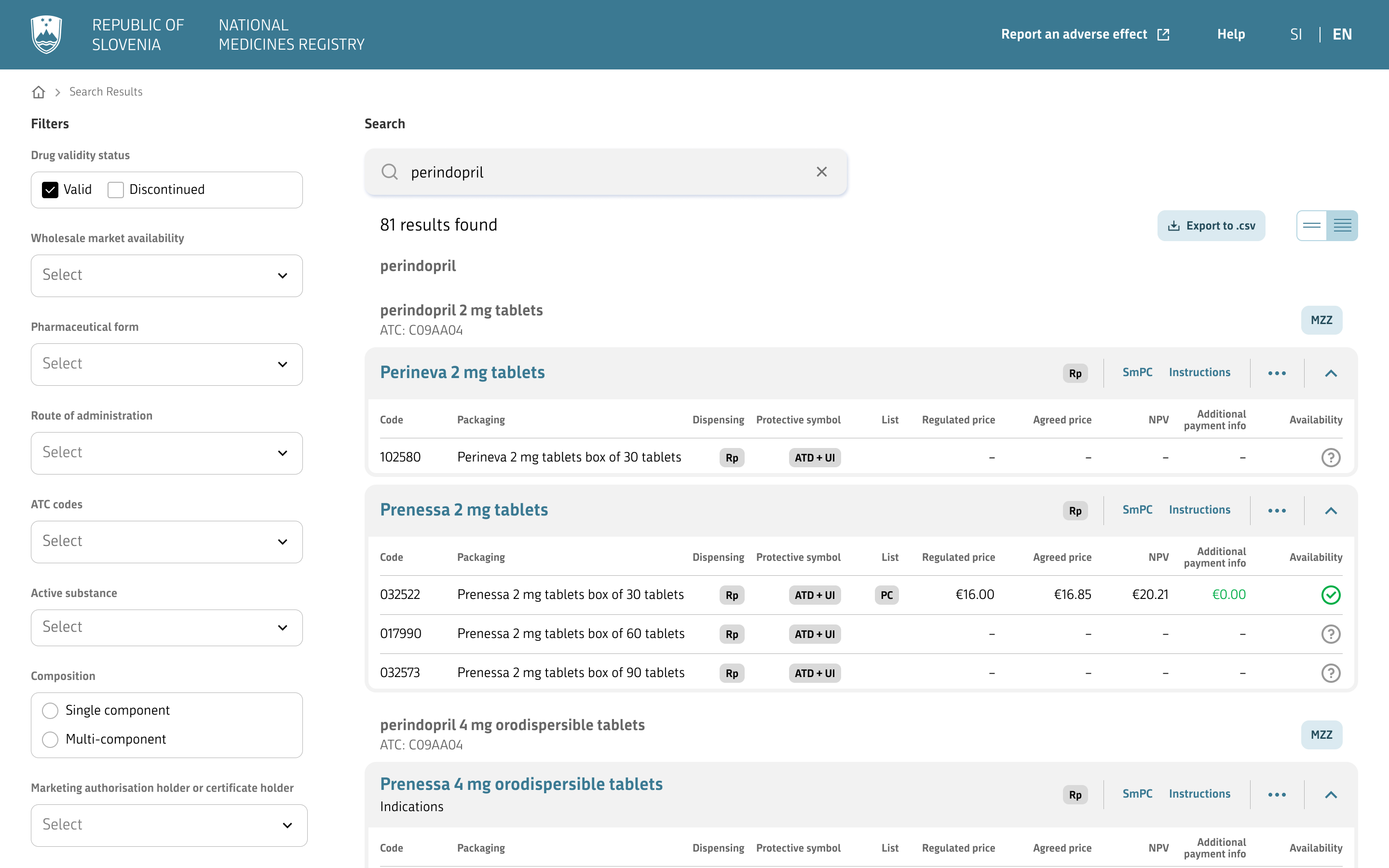
During use, the user can switch between the collapsed and expanded view, use filters as needed, and access detailed information by clicking an individual medicine.
4.4. Displaying detailed medicine data
When a medicine is clicked, a page with detailed information opens. The page displays all important medicine data, divided into five main tabs: General, Composition, Packages, SmPC, and Documents.
The General tab contains general data about the medicine, including:
- general data,
- marketing authorization for the medicine,
- monitoring of medicine safety,
- ATC codes,
- route of administration,
- data on clinical use.
The Composition tab contains data on the composition of the medicine and organoleptic properties.
The Packages tab contains details on all possible packages of the medicine, including:
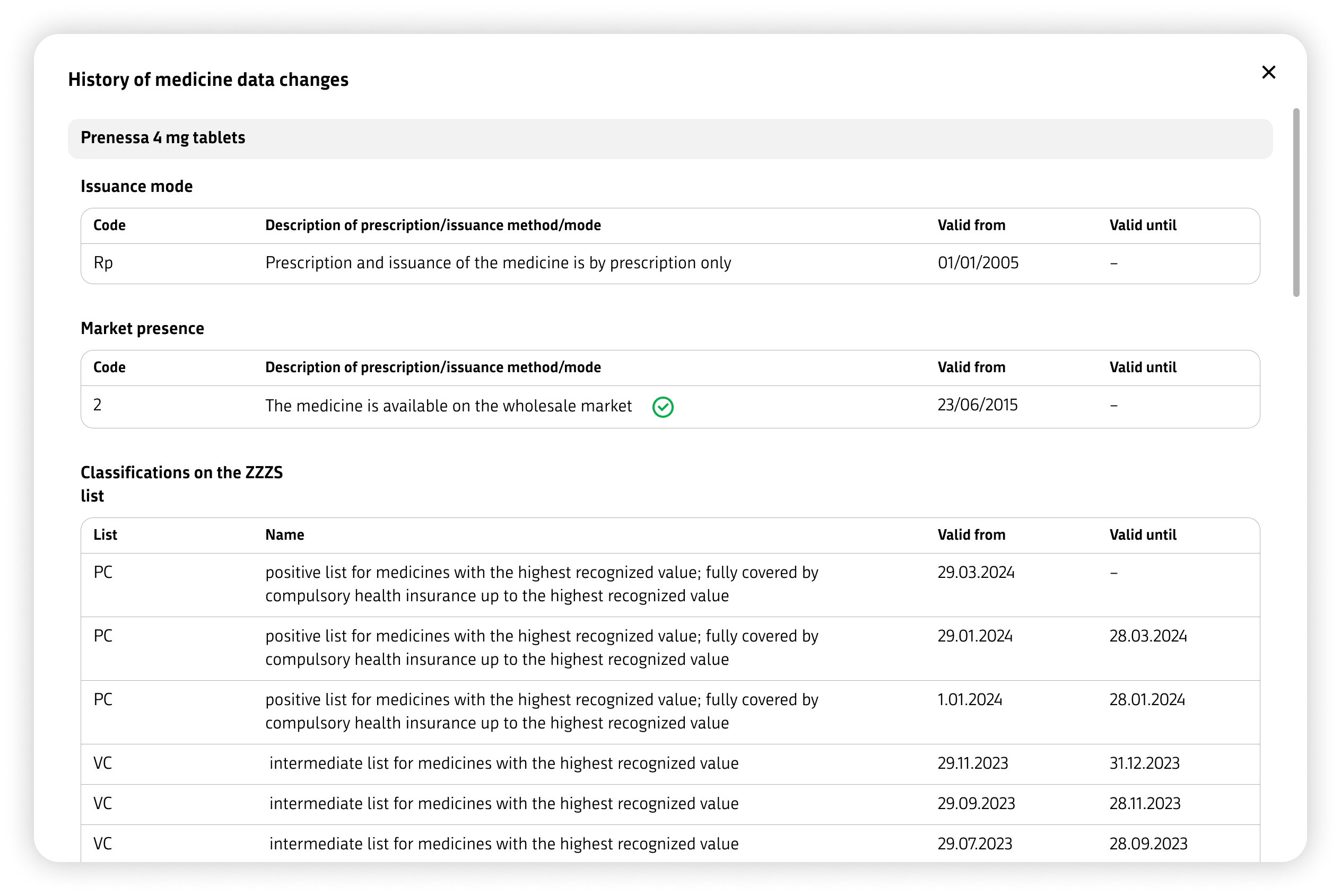
- history of changes to the medicine,
- general package data,
- medicine package data,
- medicine prices,
- data required for charging to ZZZS,
- extemporaneous preparation,
- other data,
- materials and comments.
History of changes to the medicine provides insight into all changes to the data of an individual medicine. The system records every change (e.g. entry or update), together with the time of the change, the user, and the type of action, enabling traceability and an overview of the development of data over time.
The SmPC tab contains a display of the Summary of Product Characteristics document with a table of contents on the right side, allowing easy navigation through the sections.
The Documents tab contains:
- links to .pdf documents for the medicine (Summary of Product Characteristics, Package Leaflet, ...),
- comments,
- educational materials,
- Direct Healthcare Professional Communications (DHPC).
The user can switch between tabs and access different sets of information. At the top of the page, a button is available for adding the medicine to a comparison.
Medicine comparison enables comparison of selected medicines with each other in order to quickly review differences. The user can compare up to three medicines at the same time, with all medicines compared against the first medicine added. Individual medicines can also be removed from the comparison at any time.
The following data is compared between medicines:
- active substance,
- dispensing method,
- availability,
- originator,
- pharmaceutical form,
- packages,
- legal status of the authorization,
- route of administration,
- pregnancy prevention programme,
- controlled access programme(s),
- precautionary measures / restrictions on one-time dispensing of the medicine,
- procedure type and ATC code.
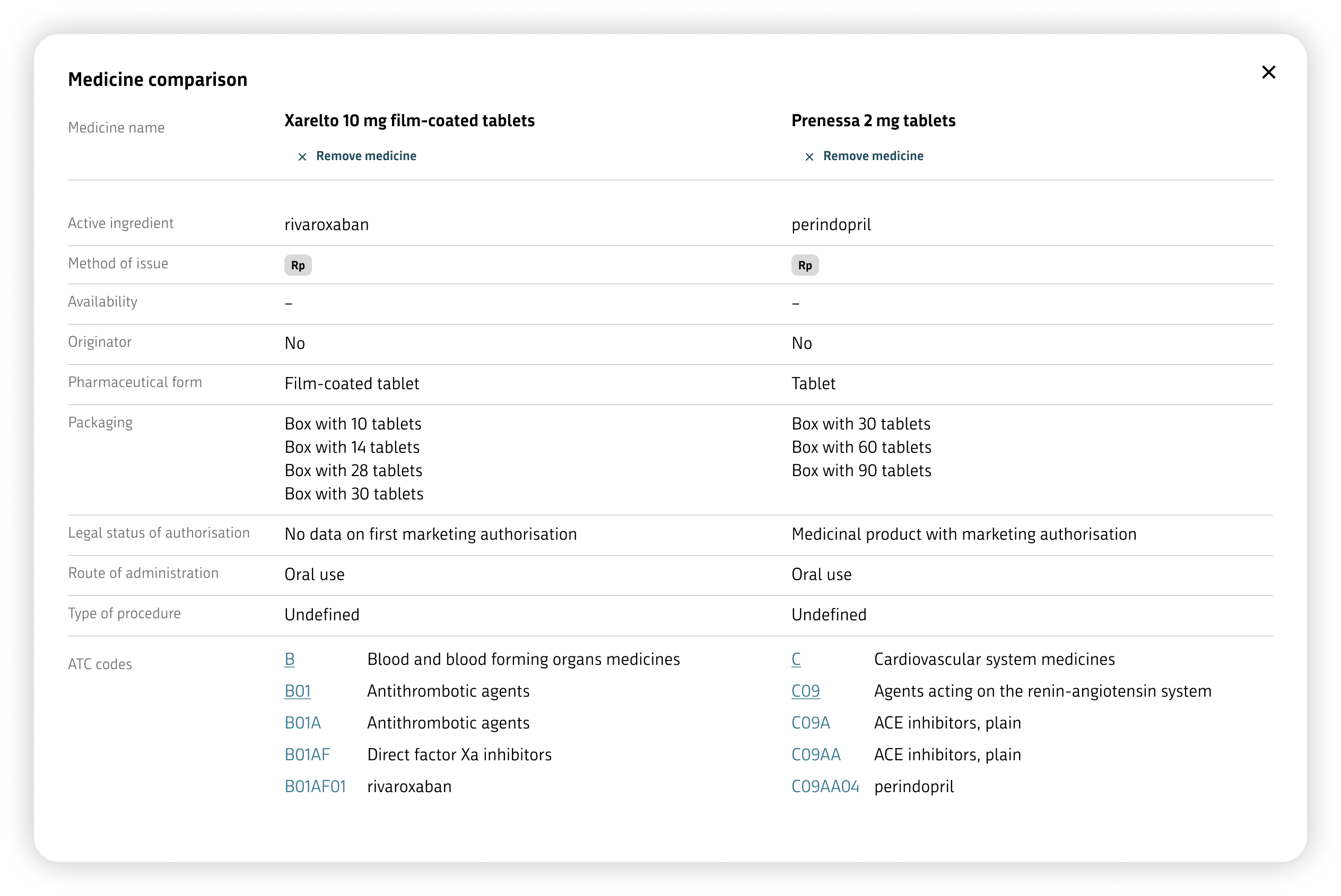
The purpose of this functionality is to provide a simple overview of the key differences between selected medicines and thereby support the user’s decision-making.
5. Frequently asked questions (FAQ)
Why can’t I find a specific medicine?
Check whether you entered the medicine name or active substance correctly. Try using a different spelling or only part of the name.
Is the data on the website reliable and up to date?
The data is updated regularly. The date of the last change is also displayed on the medicine page.
Can I check on this website whether a medicine is available?
The website displays information on the medicine status using icons (e.g. whether the medicine is on the market or whether there is a shortage).
The meaning of the icons is as follows:
Can I export the data?
Yes, lists of medicines from search results can be exported in .csv or .xml format. Exporting data for an individual medicine is currently not available.
6. Contact
For additional information or assistance, you can contact the operator of the National Medicines Registry.
Use the contact for:
- questions about data,
- reporting errors or irregularities,
- technical issues when using the application.
Contact details:
Ministry of Health
Štefanova ulica 5, 1000 Ljubljana
Phone: 01 478 60 01
Email: gp.mz@gov.si